BaseballScout
Sign in

For youth baseball coaches

Score your team's skills.
Watch them grow.

GameChanger tells you what happened in the game. Baseball Scout shows whether your players are actually getting better — skill scores tracked all season, a progress chart for every player, and a private link parents can follow. Right from your phone.

Free to use. No credit card required.
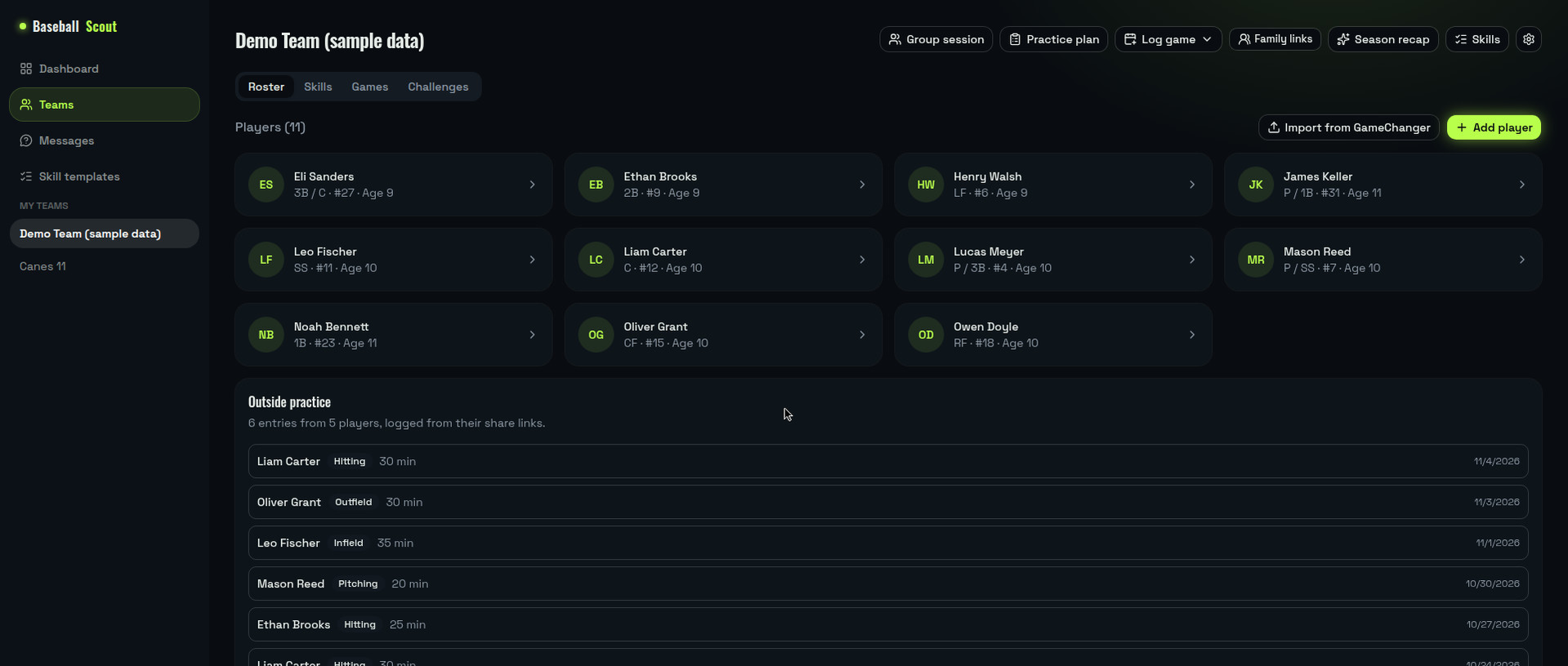
A team roster in Baseball Scout — every player, who's been evaluated, and a GameChanger import button
Your whole roster at a glance — who's been evaluated, who still needs a look. (Sample team shown.)

How it works

Scores in a notebook. Parents asking how he's doing. Tryout decisions made from memory. A season runs better than that:
Step 1

Score at practice

Group session mode walks you player by player, skill by skill — the whole roster in one practice, scored from your phone in the dugout.

Step 2

Watch them grow

Every score lands on the player's progress chart. Focus areas surface on their own, so you know what to work on next week, not next season.

Step 3

Share with parents

Each player gets one private link. Parents follow the same charts you see and can ask questions in the app — no account, no group-text archaeology.

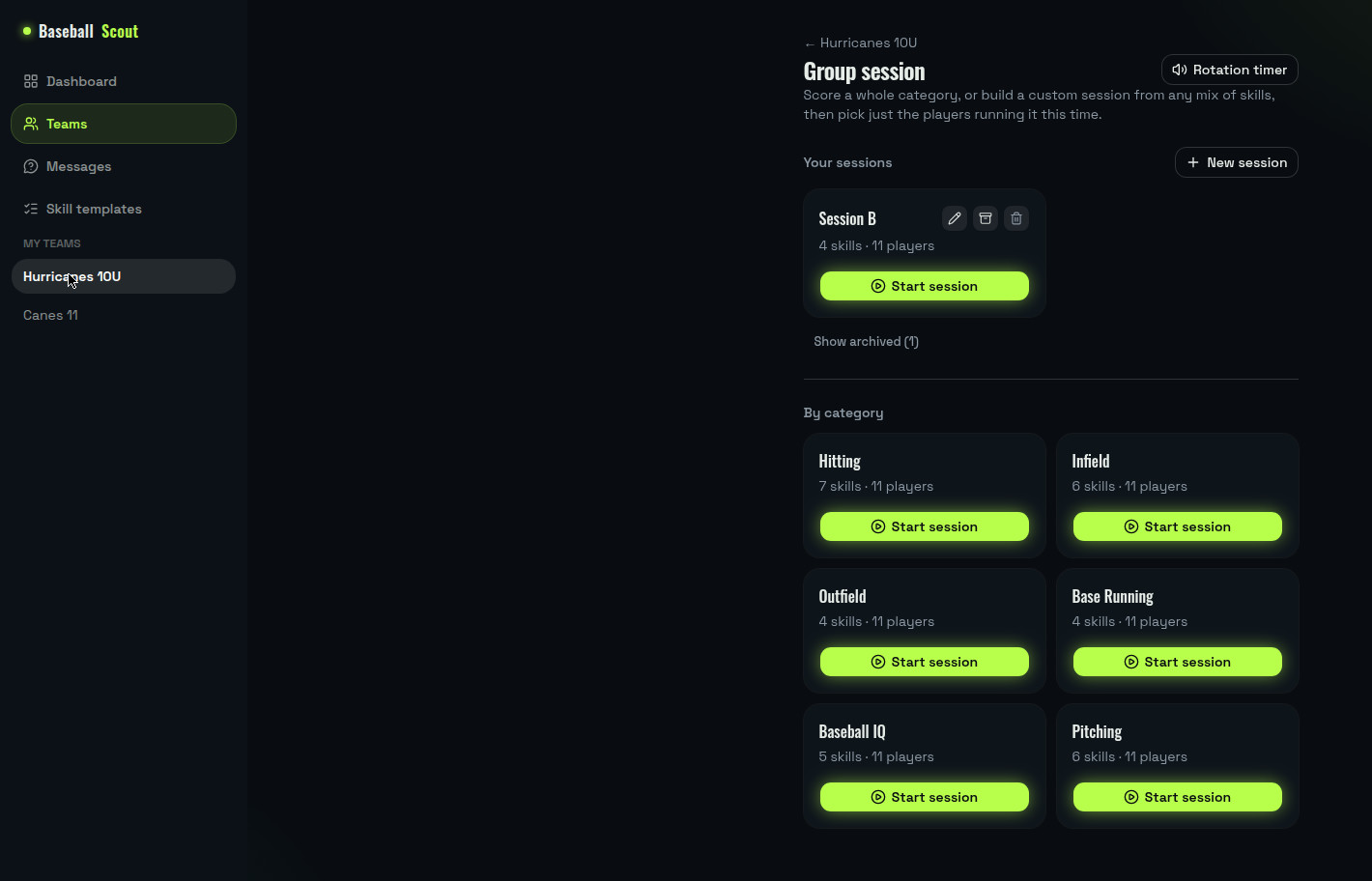
Group session mode in Baseball Scout: pick a category or a saved session and score the whole roster
Group session mode — pick a category, start, and score the roster player by player.

Score every skill

Rate hitting, throwing, fielding, and more using a skill list you control — start from our defaults or build your own.

Real game stats, too

Log batting lines by hand, or import them straight from a GameChanger export — box scores and a season average trend, right alongside skill scores.

Evaluate the whole roster fast

Group session mode walks you through every skill, player by player — pick just the players and skills you need, not always the whole roster.

Share progress with parents

Private links let parents follow their kid's development — no account needed — and ask questions you can answer right in the app.

Recruiting-ready profiles

Turn a season of scores into a clean, printable player profile — top skills and standout highlights, ready to send.

Built for the dugout

Install it like an app right from your phone's home screen — score players between innings, no laptop, no spreadsheets.

Parents see progress — not just playing time

Most dugout friction starts with a parent who can't see what you see. Baseball Scout gives every player a private progress page you can share with one link, so the season's growth is visible long before the parking-lot conversation.

  • One private link per player. Parents open it and see charts, focus areas, and game stats — no account, no app to install.
  • Questions land in the app, not a group text. Parents ask on the page; you answer when it suits you.
  • A profile worth printing at season's end — top skills and standout moments, ready for the next level.

Questions, answered

Is it really free?

Yes — free to use, no credit card and no trial clock. Create an account, add your team, and start scoring.

Do parents need an account?

No. Each player gets a private link that just opens — parents see their kid's progress and can ask you questions right there. Nothing to sign up for and nothing to install.

Does it replace GameChanger?

No, it works alongside it. GameChanger is great at what happened in the game; import your GameChanger export for those stats, and use Baseball Scout for the part it doesn't track — how each player's skills are developing between games.

What ages is it for?

It's built for youth baseball, rec and travel. You control the skill list, so it fits a fundamentals-first young team or an older showcase roster — you decide what gets scored.

Run this season on evidence, not memory.

Get started free

Free to use. No credit card required.